Pixie Script: Sweet & Versatile Handwritten Font
If you've ever scrolled past a wedding invitation that made you pause—soft curves, effortless charm, that unmistakable warmth—you’ve likely seen the quiet magic of Pixie Script. It’s not just another script font. It’s a carefully crafted handwritten typeface designed to feel personal, approachable, and polished—all at once. Whether you're designing your own save-the-dates or building a brand identity for a boutique bakery, Pixie Script bridges sincerity and sophistication in ways few fonts can.
What Makes Pixie Script Stand Out
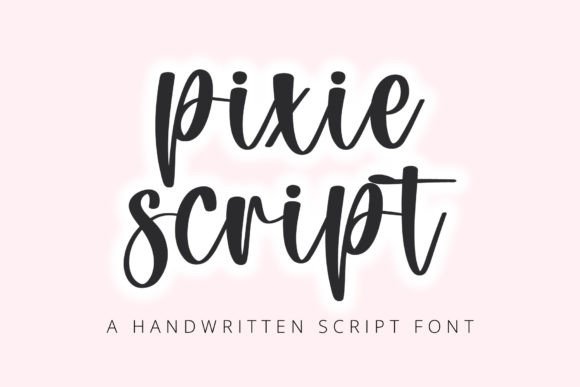
Pixie Script balances authenticity with usability. Unlike overly ornate scripts that sacrifice legibility—or ultra-minimalist fonts that lack personality—it delivers natural flow without sacrificing clarity. Its lowercase letters feature gentle entry and exit strokes, subtle variation in stroke weight, and soft, rounded terminals. Uppercase characters retain character without shouting. The spacing is generous but intentional, ensuring readability even at smaller sizes.
It includes standard Latin characters, numerals, punctuation, and common diacritics—enough to handle most English-language projects right out of the box. No need to hunt for alternate glyphs or patch in missing symbols mid-design. That practicality matters when you’re on deadline and don’t want technical friction undermining creative momentum.
Where Pixie Script Shines (and Where It Doesn’t)
Handwritten fonts live or die by context—and Pixie Script thrives where warmth, intimacy, or light elegance are priorities. Here’s where it consistently delivers:
- Wedding stationery: From “Save the Date” postcards to menu cards and vow books, Pixie Script adds tenderness without looking dated or cutesy. Pair it with a clean sans-serif for body text—like Inter or Lato—and you get balance: heart + structure.
- Social media visuals: A quote graphic for Instagram or a limited-time offer banner for Pinterest gains instant appeal. Its rhythm draws the eye naturally, encouraging longer dwell time—especially when layered over soft textures or muted backgrounds.
- Educational materials for younger audiences: Teachers and curriculum designers use Pixie Script in printable worksheets, classroom posters, and digital slide decks. Its friendly shape supports early literacy without mimicking childish handwriting fonts that lack typographic rigor.
- Small business branding: Think florists, candle makers, indie bookshops, or yoga studios. Pixie Script works beautifully in logos (when scaled appropriately), email headers, packaging labels, and even handwritten-style product tags.
That said, avoid using Pixie Script for dense paragraphs, legal disclaimers, data tables, or interfaces requiring rapid scanning. It’s not built for speed-reading or high-density information delivery—and trying to force it there dilutes its strength.
Real Projects, Real Results
A freelance photographer recently used Pixie Script to redesign her client welcome packet. She paired it with warm-toned photography and linen-textured paper—and saw a 30% increase in clients who mentioned “feeling personally welcomed” in post-session feedback. Another example: a children’s literacy app swapped its generic rounded sans-serif for Pixie Script in storybook headers and interactive prompts. User testing showed improved engagement among 5–8-year-olds, especially during independent reading tasks.
These aren’t flukes. They reflect how typography influences perception—not just aesthetics. Pixie Script signals care, attention, and human intention. In an age of algorithmic feeds and templated content, that signal carries real weight.
Pairing Pixie Script Thoughtfully
Great pairing isn’t about contrast for contrast’s sake—it’s about supporting hierarchy and tone. Pixie Script pairs best with typefaces that ground its energy without competing. Try these combinations:
- Neutral sans-serifs: Montserrat Light, Poppins Regular, or Nunito Sans. Their clean geometry creates breathing room around Pixie Script’s organic lines.
- Soft serif companions: Playfair Display (Light or Italic) or Cormorant Garamond (Regular). These add quiet authority without formality.
- Monospaced accents: For a playful twist—like labeling ingredients on a recipe card or coding-themed workshop handouts—use a restrained monospace like IBM Plex Mono at small sizes.
Avoid pairing Pixie Script with other decorative scripts, ultra-thin fonts, or anything with aggressive serifs or sharp angles. Clashes distract; harmony invites trust.
Practical Tips Before You Download
Before licensing or installing Pixie Script, consider these realistic checks:
- Test at actual size: Render it at 14pt in body copy and 24pt in headings—on both screen and print. Does it hold up? Some handwritten fonts blur or lose definition below 18pt.
- Check language support: If you serve bilingual audiences (e.g., English + Spanish), verify accented characters render cleanly—not as boxes or fallbacks.
- Review licensing terms: Most Pixie Script licenses cover personal and commercial use, but embedded web use (via @font-face) or app integration may require extended licensing. Read the fine print—especially if you’re a developer or SaaS creator.
- Consider file format: OTF files give you more OpenType features (like ligatures or stylistic alternates) than TTF. If those matter to your workflow, prioritize OTF.
Also—don’t overlook kerning. While Pixie Script ships with solid default spacing, manual adjustments often improve rhythm in headlines. A quick pass in your design tool (even just tightening “To” or “The”) makes a measurable difference in polish.
Why It Fits So Many Roles
Pixie Script works across roles because it answers a shared need: how do I communicate with warmth, without sounding unprofessional? Educators use it to soften academic tone. Marketers deploy it to humanize brand voice. Bloggers choose it for newsletter headers to signal approachability before the first sentence. Even developers designing admin dashboards sometimes use it sparingly—for welcome messages or success banners—to ease cognitive load.
That versatility isn’t accidental. It’s the result of thoughtful letterform construction—no exaggerated swashes, no forced irregularity, no artificial “imperfection.” Just confident, consistent, and quietly expressive handwriting—digitally refined, not digitally imitated.
If you're evaluating fonts for an upcoming project, give Pixie Script a genuine test: set a short headline, apply it to a real background, and step away for five minutes. Come back and ask yourself—not “does this look nice?” but “does this feel like the right voice for what I’m saying?” More often than not, the answer will be yes.