Twister Script: A Handwritten Font That Feels Human—Not Haphazard
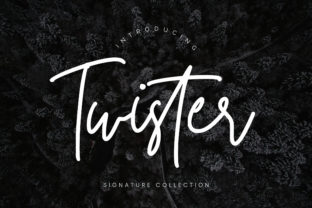
Twister Script isn’t just another “handwritten” font you find in a free bundle. Inspired by careful calligraphy, it’s a light, flowing script with genuine rhythm and subtle variation—each character shaped with intention, not algorithmic mimicry. It breathes. It pauses. It leans just enough to feel personal without sacrificing readability. That’s why designers, educators, small business owners, and even bloggers reach for Twister Script when they want warmth, authenticity, and quiet confidence—not forced quirkiness or tired clichés.
Assuming “Handwritten” Means “Easy to Use” (It Doesn’t)
Many people download Twister Script expecting plug-and-play charm—only to discover it doesn’t behave like a standard sans serif. Twister Script is a script, not a display font masquerading as handwriting. That means it relies on OpenType features like contextual alternates and ligatures to achieve its natural flow. Without enabling those features in design software (like Illustrator, Affinity Designer, or modern versions of Figma), letters may look disconnected, stiff, or oddly spaced—like someone trying to write beautifully while wearing gloves.
For example, typing “love” in Twister Script without ligatures might render the “o” and “v” as separate shapes with awkward gaps. With ligatures enabled? The “o” and “v” connect smoothly, echoing how a real hand would lift and reposition. The fix isn’t complicated—but it’s essential. Before using Twister Script in any project, check your software’s glyph panel or typography settings. In most apps, toggling “Contextual Alternates” and “Standard Ligatures” unlocks the font’s intended motion and personality.
Overlooking Weight and Contrast in Real-World Contexts
Twister Script is intentionally light—delicate, airy, and graceful. That’s its strength. But it’s also its limitation in certain applications. Using it at 12 pt for body text on a printed flyer? It’ll vanish under fluorescent lighting or fade in low-resolution PDF exports. Setting it at 48 pt for a café chalkboard sign? It may lack the visual weight to hold attention across a busy room.
This isn’t a flaw—it’s a design cue. Twister Script excels where subtlety supports meaning: wedding invitations, boutique packaging, teacher feedback notes, podcast episode titles, or minimalist brand accents. It’s less suited for legal disclaimers, accessibility-critical interfaces, or outdoor signage. Ask yourself: *Is legibility the priority—or emotional resonance?* If the answer is both, pair Twister Script with a clean, highly legible companion font (like a warm serif or neutral sans) for balance. Never force it into roles it wasn’t built for.
Mistaking Free Previews for Full Functionality
You’ll often see Twister Script offered as a “free demo” with only uppercase letters, no punctuation, or missing numerals. That’s not generosity—it’s a preview constraint. Those demos exist to show style, not utility. When you move from demo to full version, you’ll gain access to lowercase letters with proper ascenders and descenders, stylistic alternates (like a swash “g” or looped “y”), multilingual support (including accented characters for French, Spanish, or German), and consistent spacing across all glyphs.
Here’s what to verify before purchasing or licensing Twister Script:
- Character coverage: Does it include punctuation, currency symbols, and language-specific diacritics you actually need?
- File formats: Are OTF and WOFF2 included? OTF ensures full OpenType support in design tools; WOFF2 lets you use it safely on websites.
- Licensing clarity: Is it licensed for web use, commercial print, or merchandise? Some licenses exclude social media templates or digital products—you’ll want that spelled out upfront.
Ignoring How It Performs Across Devices and Platforms
Twister Script looks stunning on your high-DPI Mac screen—but what about a customer opening your email on an Android device? Or viewing your Instagram Story on an older iPhone? Not all platforms render variable-width scripts equally well. Some compress letter spacing; others substitute fallback fonts silently. That elegant “&” you carefully kerned? It might render as a generic ampersand on Windows Chrome unless you’ve embedded the font properly via @font-face or used a service like Google Fonts (if available) with appropriate loading strategies.
A better approach: test early and often. Export a PDF and open it on a phone. Paste sample text into a Gmail draft and view it on mobile. Use browser dev tools to inspect whether Twister Script is loading—or being swapped out. If fidelity matters (e.g., for a brand guideline document), consider converting key headlines to outlines—but only after final approval, since outlined text can’t be edited or translated later.
Underestimating the Power of Intentional Spacing
Because Twister Script flows so naturally, it’s tempting to let tracking and kerning default to “auto.” Don’t. Its light weight and organic structure mean inconsistent spacing becomes visible faster than in bolder fonts. A headline like “Summer Sale” might look perfect at first glance—until you notice the space between “m” and “S” feels too wide, breaking the visual rhythm.
Take five minutes to manually adjust kerning pairs in your design app. Focus on common trouble spots: uppercase + lowercase transitions (“A” + “n”), letters with diagonal strokes (“V”, “W”, “Y”), and punctuation next to tall ascenders. Even small tweaks—+10 or –20 units—can restore balance and make Twister Script feel considered, not casual.
Choosing Twister Script Thoughtfully, Not Just Trendily
There’s nothing wrong with loving Twister Script because it feels fresh or calming. But lasting value comes from alignment—not aesthetics alone. Ask yourself honestly:
- Does this font reflect the tone my audience expects—not just what I personally enjoy?
- Will it scale gracefully across my most-used mediums (print, web, video thumbnails)?
- Do I have the time and tools to use its features properly—or will I dilute its impact through oversight?
If Twister Script fits those questions, it’ll do more than look nice—it’ll deepen trust, reinforce voice, and quietly elevate your work. If not, there’s no shame in choosing something sturdier, clearer, or more versatile. Great typography isn’t about chasing trends. It’s about choosing the right tool—and using it with care.