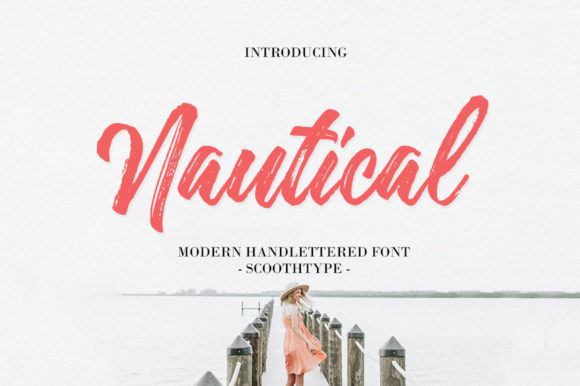
Nautical
There’s a quiet magic in handwriting that feels both personal and timeless—especially when it flows with gentle rhythm, soft contrast, and subtle warmth. Nautical is exactly that kind of font: a lovely brushed handwritten typeface with a sweet, natural flow. It’s not overly ornate or rigidly formal—it breathes like ink on paper, making it ideal for wedding invitations, boutique stationery, thoughtful social media graphics, artisan packaging, and heartfelt digital announcements.
What Nautical Actually Is (and What It Isn’t)
Nautical is a single-style, brush-script font—not a full family with weights, alternates, or OpenType features. It’s designed to evoke the charm of hand-lettered elegance, not the precision of a calligrapher’s copperplate or the versatility of a multi-weight sans serif. That distinction matters. Some users assume it includes swashes, ligatures, or stylistic sets because it looks “handwritten,” only to discover it’s intentionally minimal—clean, cohesive, and consistent across characters.
This simplicity is its strength—but also where expectations can misalign. If you’re looking for dramatic flourishes or tight kerning control for dense body text, Nautical won’t deliver. And that’s okay. Its purpose is expressive emphasis: a name on an envelope, a tagline over a soft photo, a quote in a newsletter header—not paragraphs of fine print.
Avoiding the “Too Much, Too Fast” Trap
One common misstep? Using Nautical at small sizes or in long blocks of text. Its delicate strokes and variable line weight begin to blur below 18–20pt in print—or even larger on low-resolution screens. A client once used it for an entire wedding program booklet at 14pt. The result was charming in concept, but hard to read in practice—guests squinted, missed details, and some even asked for verbal clarifications.
Better approach: Reserve Nautical for headlines, names, short phrases, and decorative accents. Pair it thoughtfully—say, with a warm, highly legible serif like Lora or a clean, neutral sans like Inter—for supporting text. That contrast doesn’t compete; it supports intention.
Watch Out for Licensing Surprises
Nautical is available through reputable foundries and marketplaces—but licensing terms vary. Some versions are labeled “free for personal use only,” while others require a commercial license for anything tied to income—even a single Instagram post promoting your freelance design services or a printable you sell on Etsy. Assuming “free download = free to use anywhere” is a frequent oversight.
That assumption has led to takedown notices, delayed projects, and awkward conversations with clients. One educator created a set of classroom posters using an unlicensed version, only to realize mid-print run that redistribution—even within her school—wasn’t covered.
Before downloading or purchasing: Read the license summary carefully. Look for clear language about web embedding, app usage, merchandise, and resale rights. When in doubt, contact the vendor directly—or choose a version with a straightforward, permissive license (like SIL Open Font License, if available).
Don’t Skip the Technical Check
Even licensed fonts can behave unexpectedly depending on your software and output method. Nautical uses standard Unicode character mapping, but it doesn’t include extended Latin characters (like Č, Ñ, or ű) out of the box—and no built-in multilingual support. If your audience includes Spanish, Czech, or Vietnamese speakers, test key names and phrases early.
Also check how it renders in your email client or CMS. Some platforms substitute fonts automatically if web fonts aren’t properly loaded or hosted. You might love how “Forever & Always” looks in Adobe Illustrator—but if it defaults to Times New Roman in Gmail, the emotional impact vanishes.
Practical tip: Export test PDFs, preview emails on multiple devices, and view social graphics on both desktop and mobile before finalizing. Small discrepancies add up—especially when tone and trust are at stake.
Why Pairing Matters More Than You Think
Nautical shines brightest when it’s not working alone. Its warmth and rhythm need grounding—something stable, readable, and intentional beside it. Yet many creators default to pairing it with another script font (“to keep it all ‘handwritten’”) or a heavy display typeface (“for contrast”), unintentionally creating visual noise.
For example, one small business owner paired Nautical with a bold, angular blackletter for her café’s menu board. The effect wasn’t vintage charm—it felt jarring and difficult to scan quickly. Customers lingered less, ordered slower, and staff reported more repeat questions.
Better pairing principles:
- Contrast by structure, not just weight: Choose a typeface with clear x-height and open counters (like Merriweather or Source Serif Pro) to balance Nautical’s fluidity.
- Mind the mood match: Avoid clashing tones—e.g., pairing Nautical’s gentle flow with a harsh, tech-inspired sans like Orbitron. They speak different languages.
- Test hierarchy in context: Type “Your Name • Saturday, June 15 • Seaside Gardens” in both fonts. Does the eye land first where you intend?
Realistic Expectations = Better Results
Nautical isn’t a shortcut to “elegant.” It’s a tool—one that rewards attention to detail, context, and craft. It won’t fix weak layout, poor color contrast, or unclear messaging. But applied with care, it adds sincerity, warmth, and intentionality that generic fonts simply can’t replicate.
If you’re designing for emotion—love, celebration, gratitude, nostalgia—Nautical helps say it softly, clearly, and memorably. Just remember: its beauty lives in restraint, not repetition. Use it where it earns its place—not everywhere you can.
So before you drop it into your next project, ask yourself: Is this the voice I want to lead with? Does it serve the reader—not just my aesthetic preference? When those answers align, Nautical does more than look lovely. It connects.