More Brusher: The Handwritten Brush Font That Adds Personality to Every Project
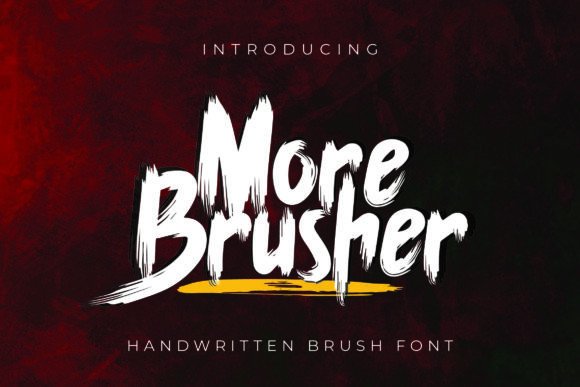
Imagine a font that feels like it was drawn by hand—full of energy, rhythm, and subtle imperfections that make it feel alive. That’s More Brusher: a distinctive handwritten brush font designed for creators who want authenticity without sacrificing versatility. It’s not just another script—it’s a carefully crafted tool built to stand out in logos, packaging, social media graphics, editorial layouts, and beyond.
What Makes More Brusher Different?
At first glance, More Brusher looks like spontaneous ink-on-paper calligraphy—but its design is intentional. Each character balances natural flow with consistent spacing and weight distribution, so text remains legible even at smaller sizes. Unlike many brush fonts that sacrifice readability for flair, More Brusher delivers both personality and practicality.
The font includes over 300 glyphs—including uppercase and lowercase letters, numerals, punctuation, multilingual accents (supporting Latin-based languages), and a rich set of decorative elements like flourishes, swashes, and connecting strokes. What truly sets it apart, though, is how those extras are organized and accessed.
OpenType Features That Empower Designers
More Brusher is packed with OpenType features—advanced typographic tools built into the font file itself. These aren’t just gimmicks; they’re functional enhancements that give you real control over your typography:
- Stylistic Sets: Predefined groups of alternate characters (e.g., Set 1 offers bolder terminals; Set 2 adds delicate hairlines). Toggle them on or off depending on your mood or brand voice.
- Stylistic Alternates: Individual character swaps—like swapping a standard “a” for one with a looping tail or a “g” with an open bowl. Perfect for fine-tuning visual rhythm.
- Ligatures: Smart combinations like “fi”, “fl”, or custom pairings (“Th”, “Qu”) that improve spacing and elegance automatically.
You don’t need coding skills to use these. Just open More Brusher in any OpenType-savvy program: Adobe Illustrator, InDesign, Photoshop (with Character panel enabled), CorelDRAW X7+, or even Microsoft Word (via the Font dialog > Advanced tab). No plugins required—just select the text and choose your feature from the dropdown menu.
Why PUA Encoding Matters (And Why You’ll Appreciate It)
Here’s something many users overlook: More Brusher uses Private Use Area (PUA) Unicode mapping. In plain terms? Every alternate glyph has its own dedicated keyboard-accessible slot—even if it doesn’t correspond to a standard letter or symbol.
This means you can type “A” and get a standard capital A—or hold down Alt (Windows) or Option (Mac), type a specific code, and instantly insert a swash-heavy version. No hunting through glyph panels. No copy-pasting from PDF cheat sheets. Just fast, intuitive access—ideal when you're iterating quickly or designing under deadline.
Where Does More Brusher Shine in Real Life?
It’s one thing to talk about features—but where does More Brusher actually deliver value? Let’s look at everyday scenarios:
- Small Business Branding: A local bakery uses More Brusher for its logo and packaging labels—giving customers an immediate sense of warmth and handmade care. The Stylistic Alternates let them tweak the logo slightly for seasonal campaigns (e.g., a leafy “S” for spring, a snow-dusted “W” for winter).
- Social Media Creators: Instagram designers layer More Brusher over lifestyle photos for quote graphics. Because the font includes varied stroke weights and organic entry/exit strokes, text blends naturally—not stiff or digitally perfect, but human and inviting.
- Film & Event Titles: Indie filmmakers choose More Brusher for movie posters and title sequences. Its expressive energy works especially well for coming-of-age dramas, documentary series, or creative workshops—anything where tone matters as much as content.
- Educational Materials: Teachers and course creators use it in slide decks and printable worksheets. The friendly yet structured appearance helps reduce cognitive load while keeping younger audiences engaged.
Who Benefits Most From This Font?
More Brusher isn’t just for graphic designers. It serves a wide range of users:
- Freelancers & Agencies: Speed up client revisions with built-in alternates instead of redrawing letters manually.
- Entrepreneurs: Create cohesive branding assets—even without design experience—thanks to intuitive OpenType controls.
- Content Creators: Stand out in crowded feeds with visually distinct headlines and captions.
- Hobbyists & Students: Learn typography fundamentals by experimenting with real-world features like ligatures and stylistic sets.
Things to Keep in Mind
Like any specialized tool, More Brusher excels in certain contexts—and has natural boundaries:
- Best for display use: While highly legible at medium-to-large sizes, avoid using it for long paragraphs or tiny UI text. It’s meant to be seen—not scanned.
- Not a system font: It won’t appear by default on websites or devices unless embedded properly (e.g., via @font-face CSS or platform-specific web font services).
- Requires compatible software: Basic programs like older versions of PowerPoint or free online editors may not support OpenType features. If you rely heavily on those, test compatibility first—or use the PUA codes for manual swaps.
- License awareness: Always check usage rights. Most licenses cover desktop and web use, but commercial redistribution (e.g., bundling in templates sold on marketplaces) often requires extended licensing.
How to Decide If More Brusher Fits Your Needs
Ask yourself these questions before downloading or purchasing:
- Do I need a font that conveys creativity, approachability, or artisanal quality?
- Will I be using it primarily for headlines, logos, quotes, or short-form text—not body copy?
- Am I working in software that supports OpenType features—or am I comfortable using PUA codes for alternates?
- Does my project benefit from visual variation (e.g., multiple versions of the same word for A/B testing banners)?
If three or more answers are “yes,” More Brusher is likely a strong match. And if you're still unsure? Try pairing it with a clean sans-serif for contrast—say, More Brusher for a headline and Inter or Montserrat for supporting text. That combination alone solves countless design challenges.
A Final Thought: Typography With Intention
Fonts are never neutral. They carry tone, signal values, and shape perception—sometimes before a single word is read. More Brusher gives you the rare ability to infuse intentionality into every letter: playful yet professional, spontaneous yet refined, artistic yet usable. Whether you're launching a product, building a personal brand, or simply making something beautiful for yourself, it’s a font that doesn’t just say what you mean—it says it with character.