Collinger
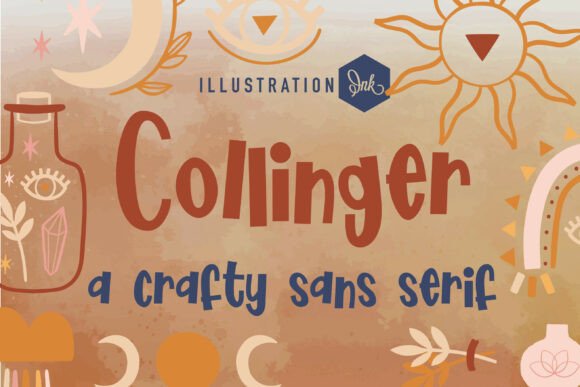
Collinger isn’t just another sans serif—it’s a deliberate pause in the digital stream. A typeface that doesn’t shout for attention but invites closer reading, slower engagement, and thoughtful presence. Designed with organic rhythm in mind, Collinger features subtly uneven strokes, soft terminals, and upright proportions that echo the warmth of ink on paper—like notes jotted during a morning planning session or labels hand-applied to ceramic mugs in a sunlit studio.
For professionals who balance craft and clarity—freelance designers building brand identities, small-batch makers labeling herbal teas, educators designing workshop handouts, or content creators shaping Instagram carousels—Collinger functions as both tool and tone-setter. It doesn’t replace system fonts or high-contrast display faces. Instead, it occupies a precise niche: where human intention meets visual execution.
Where Collinger Fits in Your Workflow
Collinger rarely appears at the start of a project—but it often arrives at a pivotal inflection point. You’ve defined your audience. Researched competitors. Drafted messaging. Now you’re deciding how that voice should *look*. That’s when Collinger earns its place—not as decoration, but as translation. It converts strategy into sensory experience.
Consider a boutique skincare line launching a new seasonal collection. Early wireframes may use generic sans serifs for layout testing. But once copy is locked and packaging mockups begin, swapping in Collinger signals a shift from functional to felt. Its slight irregularity reinforces authenticity without sacrificing legibility. On a matte-finish label, it reads as intentional—not accidental. That distinction matters when customers scan shelves in under three seconds.
Using Collinger Before the Project Begins
Pre-project use is about calibration, not creation. Before opening Figma or InDesign, spend 10 minutes exploring Collinger’s character set. Type out common words in your industry: “hand-poured,” “mindful,” “locally sourced,” “small batch.” Notice how the lowercase a, e, and g carry gentle weight, while the uppercase C and S retain openness. This isn’t academic—it’s reconnaissance. You’re learning how Collinger handles rhythm, spacing, and emphasis *before* committing to it across dozens of assets.
If you’re sourcing fonts for a client, include Collinger in early mood boards—but pair it deliberately. Try it beside a clean, neutral sans (like Inter or Lato) for body text. Or layer it over textured photography with generous line height. This helps stakeholders grasp its role: not as a full-system solution, but as a strategic accent.
During Execution: Practical Integration Tips
Collinger shines strongest at medium to large sizes—16px and up for web, 12pt and above for print. At smaller sizes, its organic details blur. So reserve it for headlines, product names, quotes, callouts, and short-form social graphics. Avoid long paragraphs or data tables.
- Pairing: Use Collinger for primary messaging and a highly legible, neutral sans (e.g., Open Sans, Roboto, or even system UI fonts) for supporting text. This maintains hierarchy without visual competition.
- Kerning: Collinger includes well-considered default spacing, but manually adjust pairs like “To,” “Tr,” or “Wa” in headlines—especially at larger sizes where subtle gaps become pronounced.
- Color & Contrast: It performs best against light, natural backgrounds—off-whites, soft creams, pale linens. On dark mode interfaces, use it sparingly and test contrast carefully; its soft terminals can recede if luminance drops below WCAG AA thresholds.
- File Formats: For web use, serve WOFF2 with fallbacks. For print, embed as outlined vectors or use OpenType features like stylistic alternates only where needed—don’t overcomplicate production files.
After Launch: Consistency and Evolution
Once live, Collinger becomes part of your brand’s quiet grammar. That means documenting usage—not just “use Collinger for headers,” but *how*: minimum size, approved color values, spacing rules, and prohibited contexts (e.g., “never used in email subject lines or app navigation bars”). A one-page internal guide prevents drift across team members, contractors, or seasonal designers.
Over time, revisit how Collinger interacts with new platforms. Does it render cleanly in Canva templates? How does it scale in responsive email clients? These aren’t afterthoughts—they’re maintenance tasks that preserve integrity. If you add video content, test Collinger in motion graphics: does its warmth survive frame-by-frame rendering, or does it soften too much? Small observations compound into long-term reliability.
Real-World Integration Examples
A yoga studio’s rebrand: The owner drafts class descriptions and values statements in Google Docs using Collinger via a browser extension. When finalizing the website, they apply it to section titles and instructor bios—keeping body copy in a readable system font. Print posters follow the same logic: Collinger for “Breathe Deeply,” system font for schedule details.
An indie publisher’s chapbook series: Each title uses Collinger on the cover, printed letterpress-style. Inside, the typeface appears only on chapter openers and epigraphs—never in running text. This creates visual breathing room while reinforcing the tactile, handmade ethos readers associate with the imprint.
A freelance educator’s course landing page: They use Collinger for the headline (“Design With Intention”) and testimonial pull-quotes, then switch to a clean sans for bullet points, pricing tiers, and CTA buttons. The result feels personal but remains scannable—a balance essential for conversion-focused pages.
Compatibility and Constraints
Collinger works reliably across modern browsers and design tools (Figma, Adobe Creative Cloud, Sketch). It supports Latin Extended-A characters, making it suitable for most English-language projects—and many European languages—but lacks Cyrillic, Greek, or extended diacritics. If your audience includes multilingual speakers beyond Western Europe, plan for graceful fallbacks or supplemental typefaces.
It’s not built for rapid-fire UI work—don’t reach for Collinger when mocking up dashboard menus or complex forms. Its strength lies in moments of emphasis, reflection, or invitation. Knowing *when not to use it* is as important as knowing when to.
Long-Term Value: Beyond Aesthetics
What makes Collinger sustainable isn’t just its visual appeal—it’s how it aligns with evolving expectations around authenticity and care. As audiences grow more sensitive to algorithmic sameness, typefaces that signal human input gain quiet authority. Using Collinger consistently over months or years builds recognition not through repetition alone, but through resonance: each appearance reinforces a feeling of groundedness, attention, and intentionality.
That doesn’t mean it’s static. Revisit usage annually. Ask: Does it still reflect our current voice? Has our audience’s relationship to “handmade” shifted? Are newer tools expanding how we apply it—like variable font axes for subtle weight shifts in motion graphics? Staying engaged with those questions ensures Collinger remains a living part of your process—not a relic of an early mood board.
Ultimately, Collinger serves best when treated as a collaborator—not a component. It asks for thoughtful placement, respectful pairing, and clear purpose. In return, it delivers something increasingly rare: typography that feels made *for people*, by people—even when rendered digitally, at scale, across time zones and devices.